

Security and account
Encrypted backup and restore
Export your vault to a password-protected file and restore it into any GrailVault account.
An encrypted backup is a single file with the extension .grailvault that contains all of your credentials, protected by a password you choose. It is the copy that survives even if the whole server is lost.
#Create a backup
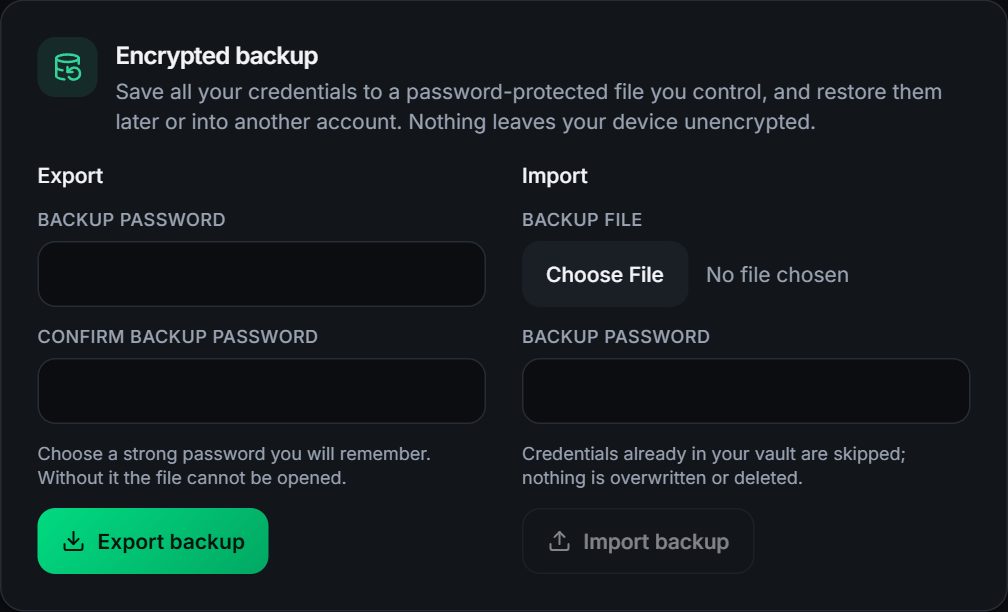
- Open Settings, Encrypted backup.
- Under Export, choose a backup password of at least 12 characters and confirm it.
- Choose Export backup. A file named like
grailvault-backup-2026-10-04.grailvaultdownloads.
Details:
- The password can be your master password or a different one. Choose something you will remember: without it the file cannot be opened.
- It includes every credential, including items in Trash.
- It is encrypted with Argon2id and XChaCha20-Poly1305. The file reveals nothing about its contents except its size. There is deliberately no plain-text export.
- Keep copies somewhere other than the server, for example another computer or an external drive.
#Restore a backup
- Open Settings, Encrypted backup.
- Under Import, choose the
.grailvaultfile and enter its backup password. - Choose Import backup.
You can restore into any GrailVault account, including a brand new one. Restoring is additive:
- Nothing in your vault is overwritten or deleted.
- Items identical to ones you already have (same type, name and fields) are skipped, so importing the same file twice does not create duplicates. You see how many were added and how many were skipped.
- Imported items are encrypted again with the receiving account's own keys.
#Safety checks
A backup file is treated as untrusted input. GrailVault checks the file type and size, refuses unreasonable settings inside a malicious file, and validates the contents before importing anything. A wrong password, or a file that was modified, is rejected with the same message.
#Your backup and ours
We keep encrypted backups of the service itself so that a hardware failure does not lose anyone's vault. They hold only what the server holds: encrypted data we cannot read. Your own export is still worth having: it is the copy you control, it works even if you ever leave the service, and it is the safest way to move your vault to another account.
You can also export a plain CSV file to move to another program. That file is not encrypted, so delete it when you are done.